Cloud Migration Checklist: 12 Steps for a Secure and Successful Transition
Cloud technology can help businesses improve flexibility, accessibility, collaboration, scalability, and operational efficiency. However, moving systems and data to the cloud without proper planning can create security issues, unexpected costs, downtime, and performance problems.
A successful cloud migration is not simply a matter of transferring files from an internal server to an online platform. It requires a clear understanding of the business’s applications, data, security requirements, technical dependencies, users, vendors, and long-term goals.
This cloud migration checklist explains the essential steps organizations should take before, during, and after moving their technology environment to the cloud.
Businesses can also work with DLAN Group to evaluate their current technology environment and build a secure, scalable, and business-focused cloud strategy.
What Is Cloud Migration?
Cloud migration is the process of moving applications, data, workloads, infrastructure, or business systems from an on-premises environment to a cloud platform.
It can also involve moving:
- From one cloud provider to another
- From private cloud infrastructure to a public cloud
- From public cloud services to a hybrid environment
- From outdated applications to modern cloud-based systems
- From locally installed software to Software as a Service platforms
The scope of a migration can range from moving a single business application to transforming the company’s complete technology environment.
Why Businesses Move to the Cloud
Organizations usually adopt cloud technology to improve one or more areas of their operations.
Common objectives include:
- Supporting remote and hybrid work
- Improving access to applications and data
- Scaling infrastructure more easily
- Reducing dependence on physical servers
- Improving collaboration between teams
- Strengthening backup and recovery options
- Launching services more quickly
- Supporting business expansion
- Improving system availability
- Modernizing outdated technology
- Accessing advanced analytics and automation tools
- Creating a more flexible technology environment
Cloud adoption should support measurable business goals rather than being treated as a technology trend.
The strongest cloud initiatives are usually connected to a wider plan for building a future-ready business.
Why Cloud Migrations Fail
Cloud migration projects may fail or underperform when businesses:
- Move systems without assessing their dependencies
- Underestimate migration costs
- Fail to protect sensitive data
- Choose the wrong cloud model
- Migrate unsuitable legacy applications
- Ignore employee training
- Use weak access controls
- Fail to test applications after migration
- Do not create a backup or rollback plan
- Depend on too many disconnected providers
- Lack internal ownership
- Treat migration as a one-time technical task
These problems can lead to business disruption, performance issues, compliance risks, security incidents, and higher operating costs.
A structured cloud migration checklist helps organizations address these risks before they affect operations.
Cloud Migration Checklist for Growing Businesses
1. Define the Business Case
Before selecting a cloud provider or migration method, determine why the organization wants to move to the cloud.
Possible business goals may include:
- Reducing infrastructure maintenance
- Supporting additional employees
- Opening new locations
- Improving system accessibility
- Replacing outdated technology
- Strengthening disaster recovery
- Supporting digital services
- Improving employee collaboration
- Increasing deployment speed
- Creating more predictable operations
Each objective should be specific enough to measure.
For example, instead of setting a broad goal such as “improve efficiency,” the business might aim to:
- Reduce application downtime
- Shorten new-user setup time
- Improve remote access
- Reduce server maintenance
- Restore critical data more quickly
- Support a defined number of new users
DLAN Group’s guide to digital innovation for modern businesses explains why technology investments should remain connected to operational outcomes.
2. Assess the Current Technology Environment
Create a complete inventory of the organization’s current technology assets.
This should include:
- Business applications
- Physical servers
- Virtual servers
- Databases
- Employee devices
- File storage
- Network infrastructure
- Backup systems
- Security tools
- Telecom systems
- User accounts
- Software licences
- External integrations
- Vendor-managed platforms
- Legacy applications
The assessment should identify which systems are business-critical, outdated, underused, duplicated, or no longer required.
This process may uncover hidden operational challenges that should be resolved before migration.
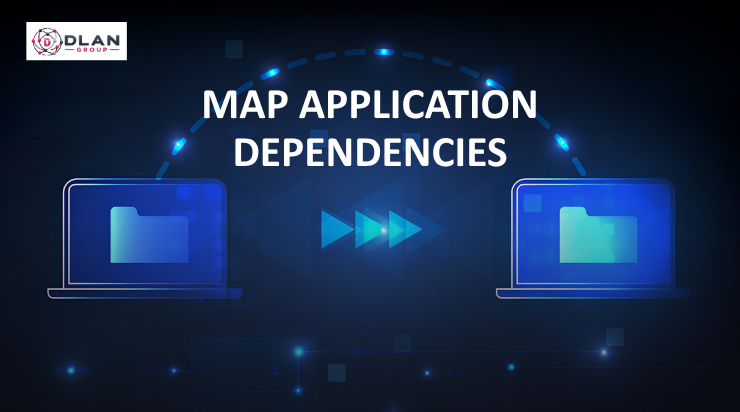
3. Map Application Dependencies
Business applications rarely operate independently.
An application may depend on:
- A specific database
- An internal server
- User authentication
- A third-party integration
- Shared file storage
- A reporting platform
- A network connection
- An external API
- A legacy application
- A particular operating system
Migrating one application without understanding its dependencies can interrupt other business processes.
Create a dependency map showing how applications, databases, users, integrations, networks, and vendors are connected.
Systems with complex dependencies may need to be migrated together or redesigned before being moved.
4. Classify Applications and Workloads
Not every application should be migrated in the same way.
Group applications according to their:
- Business importance
- Technical complexity
- Security requirements
- Performance needs
- Compliance obligations
- Data sensitivity
- Integration requirements
- Expected lifespan
Each workload can then be assigned a suitable migration approach.
Common options include:
Rehosting
The application is moved to cloud infrastructure with minimal changes.
This may provide a faster migration but does not always deliver the full benefits of cloud technology.
Replatforming
The application receives limited modifications to improve compatibility or performance in the cloud.
Refactoring
The application is redesigned or rebuilt to use cloud-native capabilities.
This may deliver greater flexibility but usually requires more time and investment.
Replacing
The existing system is replaced with a modern cloud-based application or SaaS platform.
Retaining
The application remains in its current environment because migration is not currently practical or valuable.
Retiring
The application is removed because it is outdated, duplicated, unsupported, or no longer required.
5. Choose the Right Cloud Model
Businesses can choose from several cloud deployment models.
Public Cloud
Infrastructure and services are delivered through a third-party cloud provider.
Public cloud platforms can offer flexibility, broad service availability, and easier scalability.
Private Cloud
Cloud infrastructure is dedicated to one organization.
This may provide greater control but can require more management and investment.
Hybrid Cloud
Some systems remain on-premises or in a private environment while others operate in the public cloud.
A hybrid model may be useful when certain workloads require greater control, local access, or gradual migration.
Multi-Cloud
The business uses services from more than one cloud provider.
This can reduce dependence on one platform but may also increase complexity, governance requirements, and cost-management challenges.
The right model depends on business goals, technical requirements, security needs, budget, and internal capabilities.
6. Review Security and Compliance Requirements
Security must be included from the beginning of the migration process.
The organization should identify:
- Sensitive business data
- Personal information
- Financial records
- Customer information
- Employee records
- Intellectual property
- Regulatory requirements
- Contractual obligations
- Data-location restrictions
- Retention requirements
- Access-control needs
The cloud environment should include appropriate protections such as:
- Multifactor authentication
- Role-based access
- Encryption
- Secure configuration
- Network segmentation
- Logging
- Monitoring
- Vulnerability management
- Backup protection
- Incident-response procedures
Cloud providers typically secure the underlying platform, but customers remain responsible for many areas, including user access, data protection, application configuration, and security settings.
DLAN Group’s cybersecurity-focused business ecosystem emphasizes the importance of secure infrastructure, protected users, and reliable digital operations.
7. Calculate the Total Cost of Cloud Migration
Cloud platforms can reduce some infrastructure expenses, but they do not automatically reduce total technology costs.
A realistic budget should include:
- Cloud service consumption
- Data storage
- Data transfer
- Software licences
- Migration tools
- Technical consulting
- Application changes
- Security services
- Backup storage
- Monitoring tools
- Employee training
- Testing
- Support
- Ongoing optimization
- Temporary parallel environments
Businesses should also estimate future consumption as users, applications, data, and transactions increase.
Without cost controls, unused resources, oversized systems, duplicate services, and unnecessary data storage can increase monthly expenditure.
8. Select the Right Migration Partners
Some businesses can manage limited migrations internally. More complex environments may require support from cloud architects, cybersecurity professionals, application specialists, network engineers, and managed service providers.
When evaluating a migration partner, ask:
- Which cloud platforms do you support?
- How will you assess our current environment?
- How do you protect sensitive information?
- Who will manage the project?
- How will application dependencies be identified?
- What testing will be performed?
- How will downtime be reduced?
- What happens if the migration fails?
- How will performance be monitored?
- What support is provided after migration?
Organizations should also avoid creating unnecessary complexity by using too many disconnected providers. A clear vendor consolidation strategy can improve accountability and coordination.
9. Create a Migration Roadmap
The migration roadmap should explain:
- What will be migrated
- What will remain in place
- Which systems will be retired
- Migration order
- Project owners
- Technical responsibilities
- Testing requirements
- Security controls
- User communication
- Training activities
- Expected downtime
- Rollback procedures
- Completion criteria
A phased migration is usually safer than moving every system at once.
The business may begin with:
- Low-risk applications
- Development environments
- Internal collaboration tools
- File storage
- Backup workloads
- Non-critical systems
Experience from the first phase can then improve later migrations.
10. Prepare Data for Migration
Before transferring data, review its quality, ownership, sensitivity, and business value.
The preparation process may involve:
- Removing duplicate records
- Deleting outdated information according to policy
- Correcting incomplete records
- Classifying sensitive data
- Confirming ownership
- Encrypting data
- Validating backup copies
- Defining retention requirements
- Testing transfer methods
Moving unnecessary or poor-quality data can increase costs and carry existing problems into the new environment.
11. Create a Backup and Rollback Plan
Before migration begins, create verified backups of critical applications, configurations, and data.
The business should confirm:
- Backups are complete
- Backups are protected
- Restoration has been tested
- Recovery responsibilities are assigned
- Alternative systems are available
- A rollback decision can be made quickly
A rollback plan explains how the business will return to the previous environment if the migration causes serious issues.
This should not be treated as evidence that the migration is expected to fail. It is a basic risk-management requirement.
12. Test Before Full Deployment
Testing should cover more than whether an application opens successfully.
The organization should test:
- User access
- Application functions
- Data accuracy
- Integrations
- Network connectivity
- Performance
- Security controls
- Backup procedures
- Reporting
- Employee workflows
- Mobile access
- Permissions
- Recovery procedures
Business users should participate because technical teams may not recognize every operational issue.
Testing should be completed before the previous environment is retired.
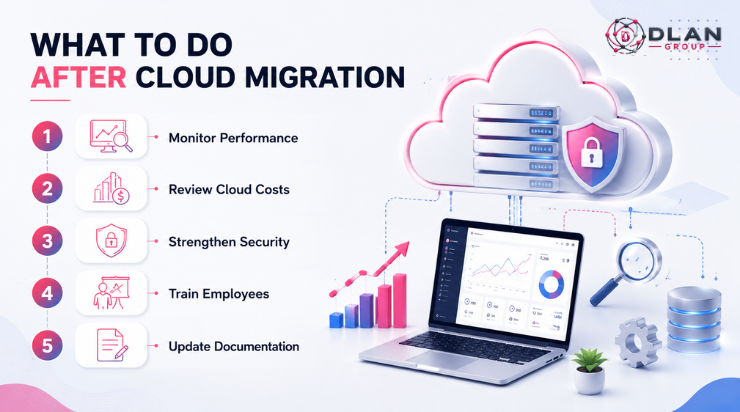
What to Do After Cloud Migration
Cloud migration is not complete when the final data transfer finishes.
The business should continue monitoring and improving the new environment.
Monitor Performance
Track:
- Application availability
- Loading times
- Network performance
- User experience
- Error rates
- Resource consumption
- Storage growth
- Support requests
Review Cloud Costs
Compare actual monthly expenditure with the migration forecast.
Look for:
- Unused resources
- Oversized infrastructure
- Duplicate services
- Unnecessary storage
- Expensive data transfer
- Inactive user accounts
- Unused software licences
Strengthen Security
Regularly review:
- Administrative access
- User permissions
- Security alerts
- System updates
- Cloud configurations
- Backup protection
- Logging
- Incident-response procedures
Train Employees
Employees should understand how to:
- Access new systems
- Store information correctly
- Share files securely
- Report technical problems
- Recognize security threats
- Follow data-handling policies
Update Documentation
Record the new environment’s:
- Architecture
- Applications
- Integrations
- User-access procedures
- Backup processes
- Supplier contacts
- Security controls
- Recovery instructions
- Support responsibilities
Strong documentation reduces dependence on individual employees and improves future decision-making.
Signs Your Business Is Ready for Cloud Migration
A cloud migration may be appropriate when:
- Existing systems are becoming unreliable
- Employees need secure remote access
- Infrastructure is difficult to scale
- Server maintenance is increasing
- Important applications are outdated
- New locations require technology access
- Backup and recovery processes are weak
- The company needs faster deployment
- Current technology limits business growth
- Multiple systems do not work together effectively
Organizations considering several technology and operational improvements can review the business services growing companies should invest in.
Common Cloud Migration Mistakes to Avoid
Avoid these common mistakes:
- Migrating without a business objective
- Moving every application without assessment
- Ignoring application dependencies
- Underestimating costs
- Failing to involve employees
- Using weak access controls
- Skipping backup testing
- Migrating poor-quality data
- Retiring the old environment too quickly
- Failing to monitor the new environment
- Choosing technology before defining requirements
- Treating security as an afterthought
Successful migration requires coordination between technology, operations, cybersecurity, finance, management, and users.
This connected approach reflects the broader move toward business services built around performance.
How DLAN Group Can Support Cloud Transformation
Cloud projects often require more than infrastructure expertise.
Businesses may also need support with:
- Cybersecurity
- Network connectivity
- Telecom
- Data management
- IT consulting
- Application planning
- Vendor coordination
- Operational continuity
- Ongoing technical support
The DLAN Group portfolio brings together specialized technology, cybersecurity, AI, digital, mobility, and business platforms under one connected ecosystem.
This allows organizations to approach cloud migration as part of a wider digital and operational strategy rather than an isolated technology project.
Conclusion: Move to the Cloud With a Clear Strategy
Cloud migration can improve scalability, accessibility, collaboration, resilience, and operational flexibility. However, these benefits depend on careful planning.
Businesses should assess their current environment, classify applications, map dependencies, protect data, calculate costs, test systems, prepare users, and define post-migration responsibilities.
A structured migration plan reduces disruption and helps ensure the cloud environment supports long-term business goals.
Plan Your Cloud Migration With DLAN Group
Moving to the cloud should make your business more secure, scalable, and efficient—not more complicated.
Contact DLAN Group to assess your cloud readiness, identify migration priorities, reduce technical risks, and build a cloud strategy aligned with your operational and growth objectives.
Frequently Asked Questions
How long does a cloud migration take?
The timeline depends on the number of applications, data volume, system complexity, security requirements, integrations, and migration approach. A small migration may take weeks, while a complex enterprise transformation may require several phases.
Should every business application be moved to the cloud?
No. Some applications may be unsuitable because of technical limitations, compliance requirements, performance needs, cost, or complex dependencies. Each application should be assessed individually.
What is the first step in cloud migration?
The first step is defining the business objectives and assessing the current technology environment, including applications, data, infrastructure, users, security requirements, and dependencies.
Can cloud migration reduce IT costs?
It can reduce some infrastructure and maintenance expenses, but savings are not guaranteed. Businesses must manage resource consumption, storage, licences, data transfer, security, and ongoing support.
How can a business reduce downtime during cloud migration?
Downtime can be reduced through phased migration, dependency mapping, testing, verified backups, parallel environments, employee communication, and a documented rollback plan.